
Instagram Comment Automation Benchmark 2026: 7 Metrics That Actually Matter
Learn which Instagram comment automation metrics to track in 2026, from DM delivery and response time to clicks, conversions, and human handoffs.
Instagram Comment Automation: Are Your Replies Actually Working?
Getting hundreds of comments on a Reel feels great. But here's the real question: are those comments turning into conversations, clicks, and customers?
Instagram comment automation can automatically turn a keyword comment like “PRICE”, “GUIDE”, or “LINK” into a private DM. But simply sending an automated DM isn't enough.
You need to know what happens after the comment. That's where these seven Instagram automation metrics come in. And don't worry—you don't need a complicated analytics dashboard.
The 7 Instagram Automation Metrics to Track
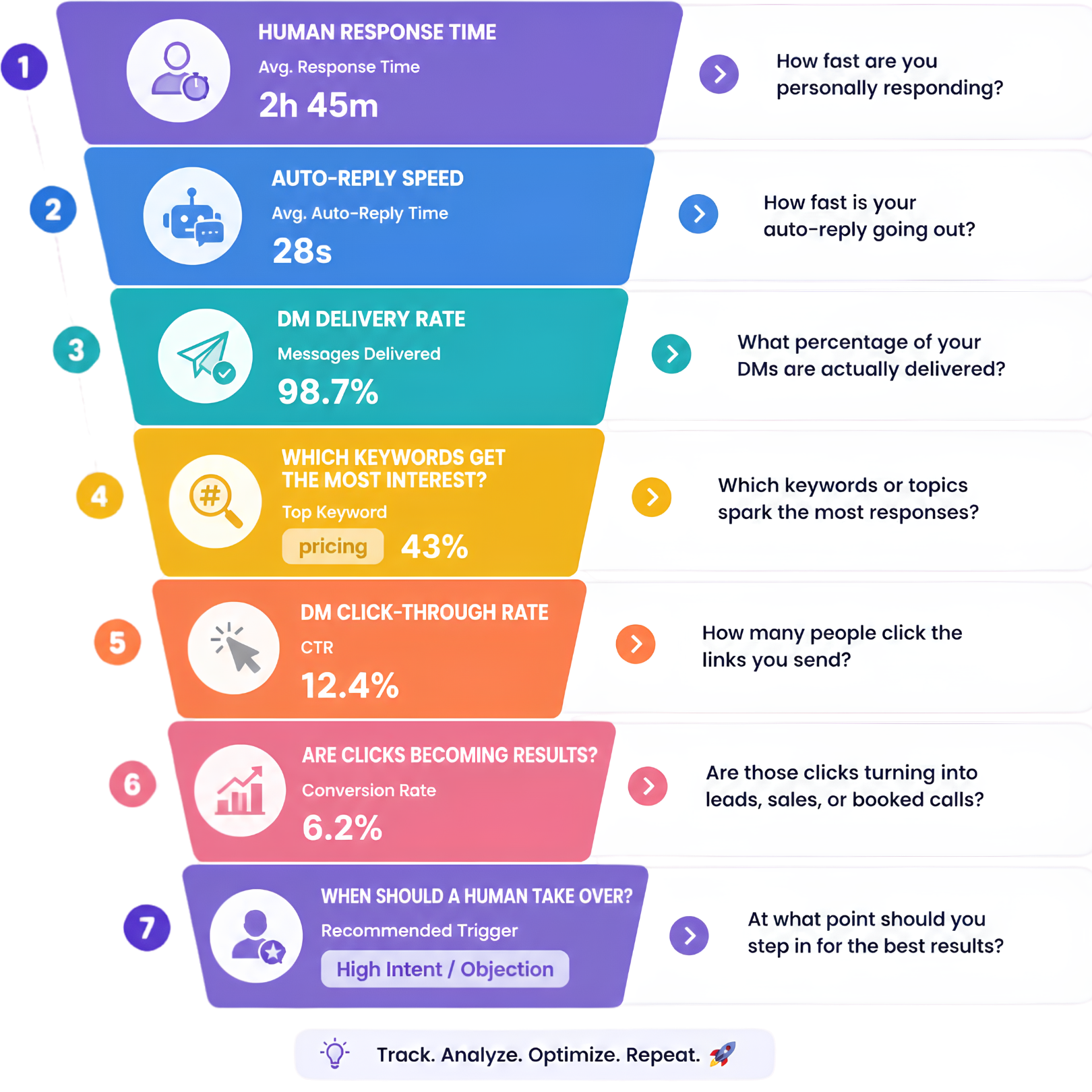
Think of your comment-to-DM journey as a simple funnel: Comment → DM → Click → Action → Human Conversation.
Each stage answers a different question about performance. Tracking the full journey helps you see whether the automation is merely sending messages or actually moving people toward a useful outcome.
- Response: How quickly a person steps in
- Speed: How quickly the automated DM is sent
- Delivery: Whether eligible users receive the DM
- Interest: Which keywords attract responses
- Clicks: Whether recipients visit the destination
- Conversions: Whether clicks become results
- Handoffs: When a human should take over
1. Human Response Time
When automation can't answer the question, how quickly does a real person step in? Human response time matters most when a conversation needs judgement, context, or a personal touch.
Track the time from the customer's question to the first human reply.
Quick win: use automation to acknowledge the message immediately, then route important conversations to your team.
- Sales questions
- Support requests
- High-value leads
- Partnership enquiries
2. Auto-Reply Speed
Someone comments “LINK.” How quickly do they receive the DM? The faster the next step happens, the less likely the person is to lose interest.
Track the time from a matching comment to the first automated DM.
If replies are slow or failing, check your keyword, Instagram permissions, workflow, and account connection before rewriting your message.
3. DM Delivery Rate
Sending a DM doesn't always mean the person received it. Your DM delivery rate shows how many eligible users actually received the automated message.
Simple formula: Delivered DMs ÷ Eligible comments × 100.
Review failed messages regularly instead of assuming the automation is working perfectly.
4. Which Keywords Get the Most Interest?
Not every keyword performs equally. Keep your Instagram keywords short, obvious, and connected to one clear offer.
- LINK: Product or landing page
- GUIDE: Free resource
- PRICE: Pricing information
- DETAILS: Product information
- BOOK: Consultation or demo
5. DM Click-Through Rate
Your automated DM has been delivered. But did the person actually click?
Click-through rate = People who clicked ÷ People who received the link × 100.
If clicks are low, your message may be doing too much. Try one clear benefit, one clear CTA, and one main link.
Instead of “Hey! Thanks for commenting! Here's some information about our product…” try the more direct “Here's the guide you asked for.”
6. Are Clicks Becoming Results?
Clicks are not the final goal. Results are.
The important thing is to choose one primary conversion goal for each automation. A creator might track email signups, an agency might track booked calls, and an ecommerce brand might track purchases.
Measure the outcome that actually matters to your business.
- A purchase
- A booked call
- An email signup
- A guide download
- A qualified lead
7. When Should a Human Take Over?
Automation shouldn't replace every conversation. It should handle the repetitive conversations so your team can focus on the important ones.
The goal isn't 100% automation. The goal is the right amount of automation.
- Complex questions: The answer needs context or judgement
- Unhappy customers: The conversation needs empathy
- Strong buying intent: A person is ready for a meaningful next step
- Personalised support: The customer needs individual guidance
- Low confidence: Automation cannot answer reliably
Your 30-Day Instagram Automation Check
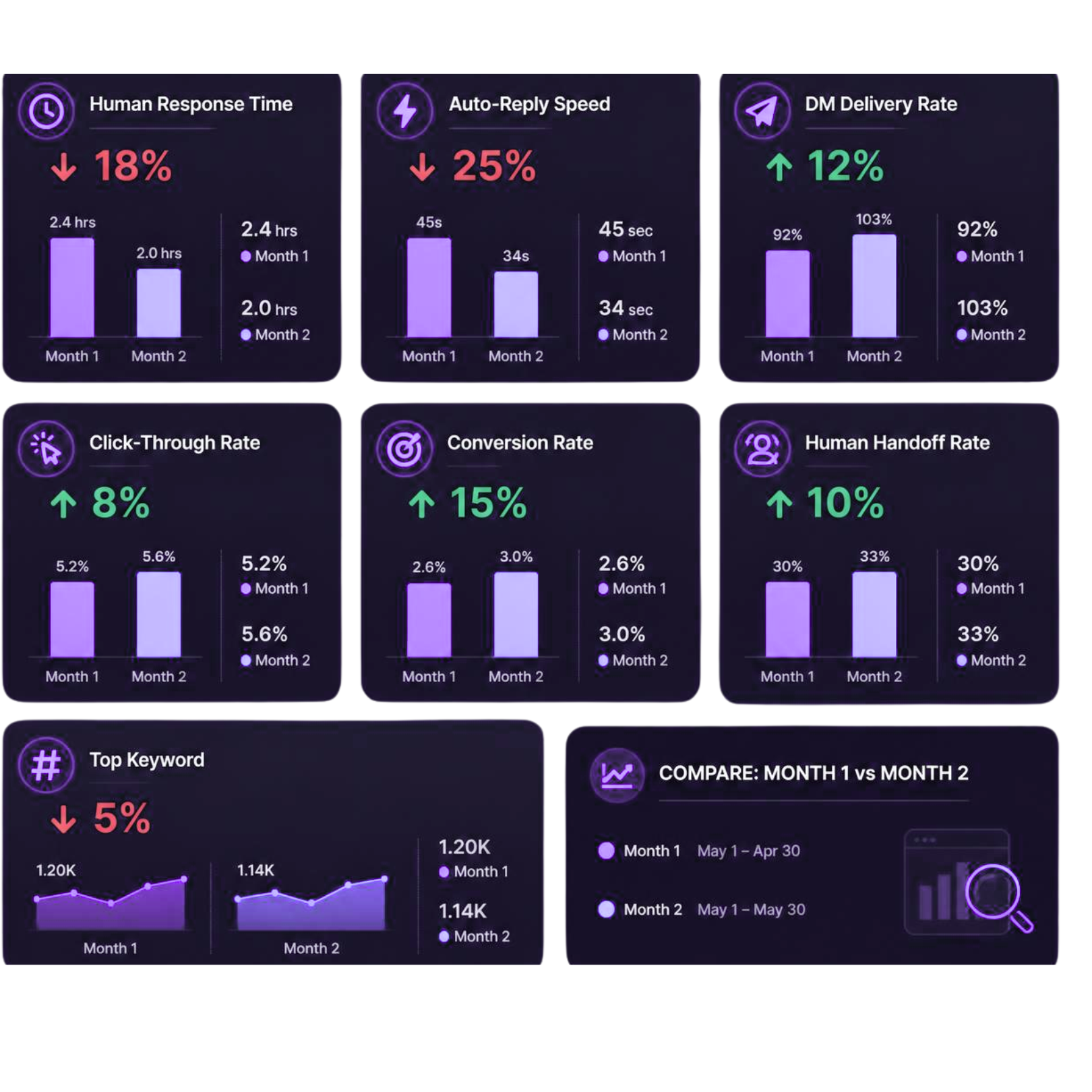
You don't need to compare your numbers with random internet benchmarks. Your own baseline is more useful.
Once every 30 days, review one comment-to-DM workflow: Comments → DMs → Delivery → Clicks → Conversions → Human Handoffs.
Low delivery? Check your workflow. Low clicks? Improve the DM. High clicks but low conversions? Improve the landing page or offer. Too many human handoffs? Identify repeated questions and automate them.
Change one thing at a time so you know what actually improved your results.
The Benchmark That Matters Most
There's no magic Instagram automation number that guarantees success. Your audience, offer, content, and goal are different from everyone else's.
So instead of asking, “What's the average?” ask, “Is my Instagram automation performing better than it did 30 days ago?”
That is the benchmark worth tracking.
Turn Instagram Comments Into Conversations
Your comments shouldn't be the end of the conversation.
With Flozari, you can turn Instagram comments into automated DMs, capture leads, answer common questions, and bring your team into the conversation when a human touch is needed.
Quick Takeaway
Start with one workflow. Track it for 30 days. Improve one thing at a time.
That's how Instagram comment automation becomes a growth system—not just an auto-reply tool.
- 1: Human response time
- 2: Auto-reply speed
- 3: DM delivery rate
- 4: Keyword performance
- 5: Click-through rate
- 6: Conversion rate
- 7: Human handoff rate
Don't miss the conversation. Don't miss the customer.
Turn Instagram comments into conversations that move your business forward.
Start automating with FlozariContinue reading
More Instagram automation guides
5 min read
How to Turn Instagram Comments Into Leads With Lead Magnets
Read article
5 min read
Instagram Automation for Creators: Save Time Without Sounding Like a Bot
Read article
6 min read